Video Features
The video system of the HTP-1 supports HDMI 2.0b and HDCP 2.3 on all ports.
It is the job of the HDMI "repeater" inside the HTP-1 to pass video according to the rules of HDMI while extracting the audio for local decoding. It has two HDMI output ports that output the same content, so the current HDMI input's video is sent to both output ports. During normal operation, audio is extracted and not passed through. Selecting a non-video input (an audio-only input) leaves the current HDMI input's video on screen while the HTP-1 renders audio from the newly selected source.
At system startup (a cold start, not a Fast Start), no video passes through the HTP-1 until its control system is up and running.
The current video status — resolution, color space, video mode, HDR status, bit depth, and 3D — is shown as Video Status on the System Status page. You can also add a Video card to the Home page: turn on Display Video Status on Homepage on the Personalize page, and it appears in the status row at the top of Home alongside Program Format and Listening Format.
Note
No video details are shown when ARC/eARC is used. Video details are available only for video received through an HTP-1 HDMI input; ARC/eARC returns audio from the TV but does not provide the HTP-1 with information about the video being displayed by the TV.
UHD Support
By default, all HDMI inputs have Ultra High Definition (UHD) support turned on. Some older source devices can have problems when the HTP-1 tells them UHD is supported — symptoms include discolored video, badly corrupted video, or no audio at all, all of the time. Each HDMI input has its own UHD Capable switch on the Inputs page. Turning it off removes UHD-related information from the EDID presented to that source, so the source only sees a 2K signal. In technical terms, the HDMI Forum Vendor Specific Data Block is removed, along with the HDMI 2.0 video timing formats found in the Short Video Descriptor block.
Note
This EDID change takes effect immediately when you flip the switch on the Inputs page. Expect a momentary disruption to the video on your TV while the EDIDs are reconfigured.
EDID Management
The HTP-1 reads and parses the downstream EDIDs and builds an internal record of what each display device connected to its two output ports can do. It then creates a combined EDID from this record to present to upstream devices (the devices connected to the HDMI inputs). The combined EDID is built with a logical AND: both downstream displays must support a capability for that capability to be enabled in the upstream EDID.
At startup (a cold start, not a Fast Start), the EDIDs are not made available to upstream devices until the control system is up and running and has loaded the correct audio descriptors. Only after that is the EDID presented to upstream devices.
Note
Turning off a downstream display does not remove its EDID capabilities from the combined EDID that the HTP-1 presents upstream. For the HTP-1 to "forget" an output port's EDID, disconnect the HDMI cable from that output and power-cycle the HTP-1 (a full power cycle, not a Fast Start).
Dolby Vision
Dolby Vision® is the one exception to the AND rule for EDID capabilities. The Dolby Vision descriptor from the downstream display connected to Output 1 is the only Dolby Vision descriptor used in the upstream EDID. If only one of your displays supports Dolby Vision, connect it to HTP-1 Output 1 for Dolby Vision to be recognized.
When Dolby Vision content is received, the HTP-1 checks the EDID of the display on Output 2 for Dolby Vision support. If it's supported, Dolby Vision is allowed to pass to that output too. If not, that output is disabled while Dolby Vision content is playing. Once Dolby Vision content stops, it can take 10–12 seconds for that output to re-enable — the HTP-1 waits to make sure the Dolby Vision content has really stopped before turning the output back on.
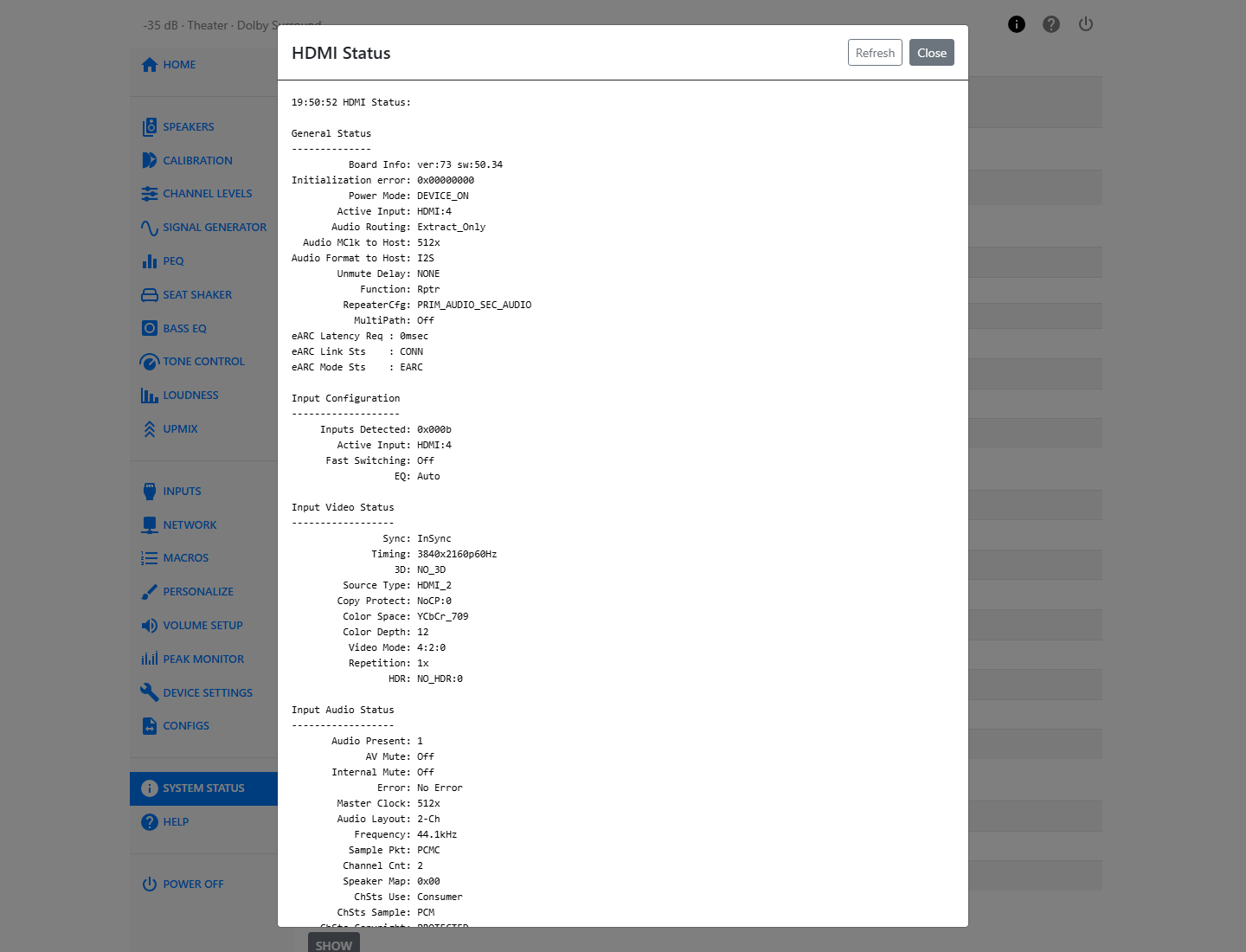
HDMI Status
The System Status page has an HDMI Status button that opens a detailed dump of the HDMI system's live state — useful when troubleshooting EDID or handshake problems with a source or display. Press Show to open it, and Refresh to pull a fresh dump without closing the dialog.
Triggers
Triggers are typically used to cause the amplifiers to turn on when the HTP-1 turns on. The HTP-1 has four 3.5 mm trigger out jacks to drive up to four amplifiers. The HTP-1 also has one trigger input that can be used to turn the HTP-1 on.
The trigger input is designed to turn on the HTP-1. Applying 12V to the trigger in will cause the HTP-1 to turn on.
Warning
If you use the trigger input, do not also use the remote or the front panel to turn the unit on or off — the trigger input takes precedence.
The trigger outputs can source 50 mA at 12V. They are enabled when the HTP-1 is turned on. The trigger outputs are over-current protected by a thermistor.