System Status
The System Status page tells you what software the HTP-1 is running, whether an update is available, and the current state of its network and HDMI connections. It also lists the exact hardware and software versions that support will ask for if you report a problem.
Software Version and Updates
The System Status page identifies the installed firmware and shows whether a newer public release is available.
Click Check for updates to refresh the available release information.
When a new release is available, the page offers an installation button and information about what has changed.
Select Version history to browse previous releases, read their release notes, or install a different version. It identifies the installed release and newer versions, lets you show release candidates/betas and older entries, and offers Reinstall for the current release. The same page is available in standby through View version history and install updates. See Version History for the controls, installation consequences and older-version precautions.
If the release server cannot be reached, System Status displays a warning rather than reporting that the software is up to date. See Updates and Support for the full update procedure.
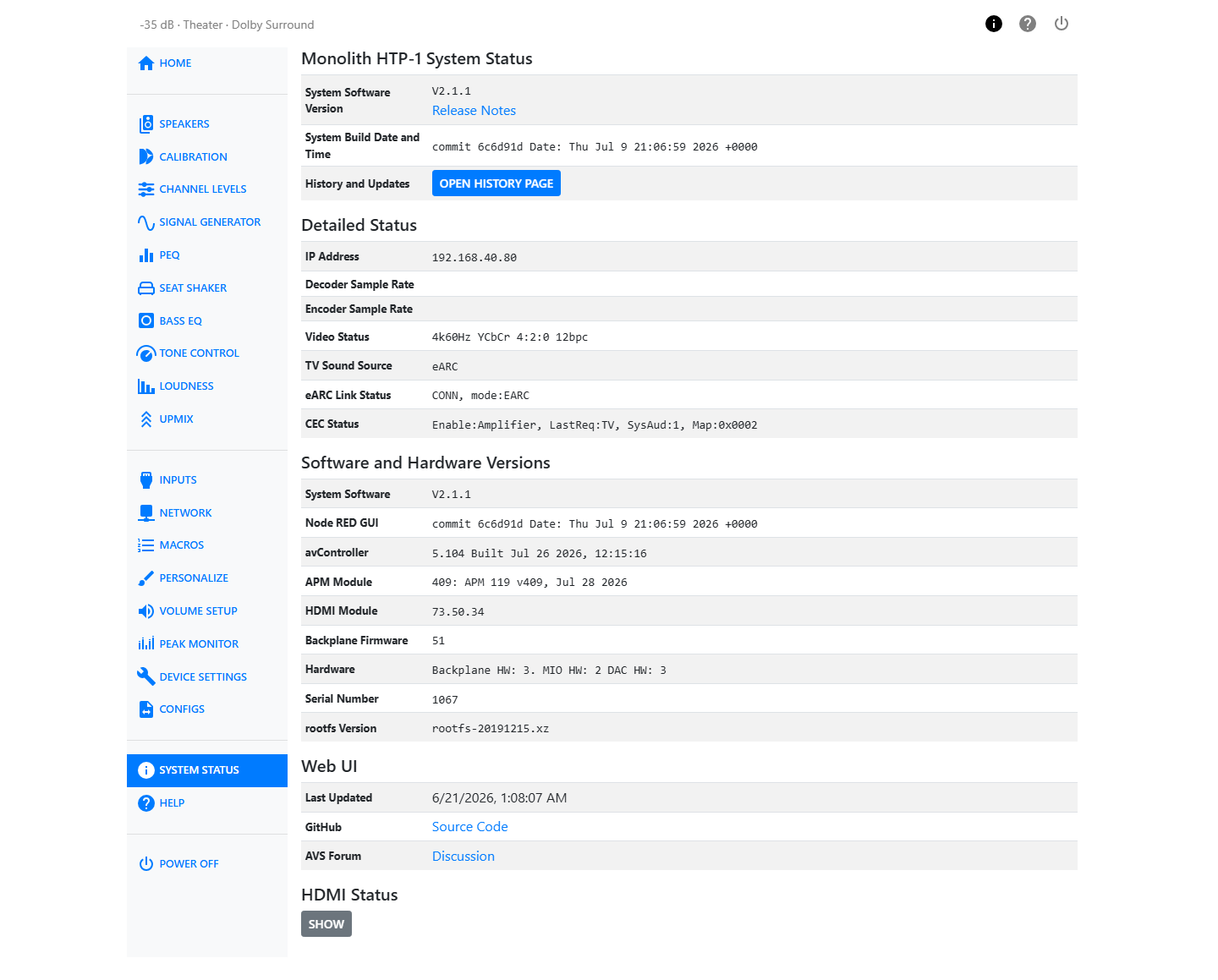
Detailed Status
| Field | What it shows |
|---|---|
| IP Address | The IP address currently assigned to the HTP-1 on your network. |
| Web UI Address | The local address for opening the HTP-1 Web UI in a browser. |
| mDNS Hostname | The HTP-1’s unique hostname used for mDNS/Bonjour discovery so applications can identify and connect to this specific unit on the local network. |
| Decoder Sample Rate | The sample rate of the incoming audio, after decoding. |
| Encoder Sample Rate | The sample rate of the audio being sent to the speaker outputs. |
| Video Status | The current video resolution, color space, chroma subsampling, HDR status, bit depth, and 3D status for video received through an HTP-1 HDMI input. No video details are shown when ARC/eARC is used. |
| TV Sound Source | Where the audio driving the TV input is coming from, for example eARC. |
| eARC Link Status | The state of the eARC connection to your TV. |
| CEC Status | The state of CEC (Consumer Electronics Control) communication with your TV and other HDMI devices. |
These last two fields report a short internal status string rather than a friendly sentence. Support may ask you to read one of them aloud, or you can copy it exactly when writing in for help. See Reference for a glossary of the terms that appear in them.
Community Discussion
Under Discussion on the System Status page, the AVS Forum HTP-1 owners thread links to the community conversation about setup, troubleshooting, and new features.
Software and Hardware Versions
This table lists every version number that identifies your unit:
| Field | What it is |
|---|---|
| System Software | The main firmware version, for example V2.2.0. |
| Node-RED GUI | The build of the control and automation layer. |
| avController | The version of the component that manages audio control and device state. |
| APM Module | The version of the audio processing module. |
| HDMI Module | The version of the HDMI receiver/transmitter firmware. |
| Backplane Firmware | The version running on the internal communication hub. |
| Hardware | The hardware revision of the backplane, MIO board, and DAC. |
| Serial Number | Your unit's serial number. |
| rootfs Version | The base Linux filesystem image version. |
Tip
If you contact support, include the System Software, avController, APM Module, and Serial Number values from this table. They let the development team match your report to the exact build you are running.
HDMI Status
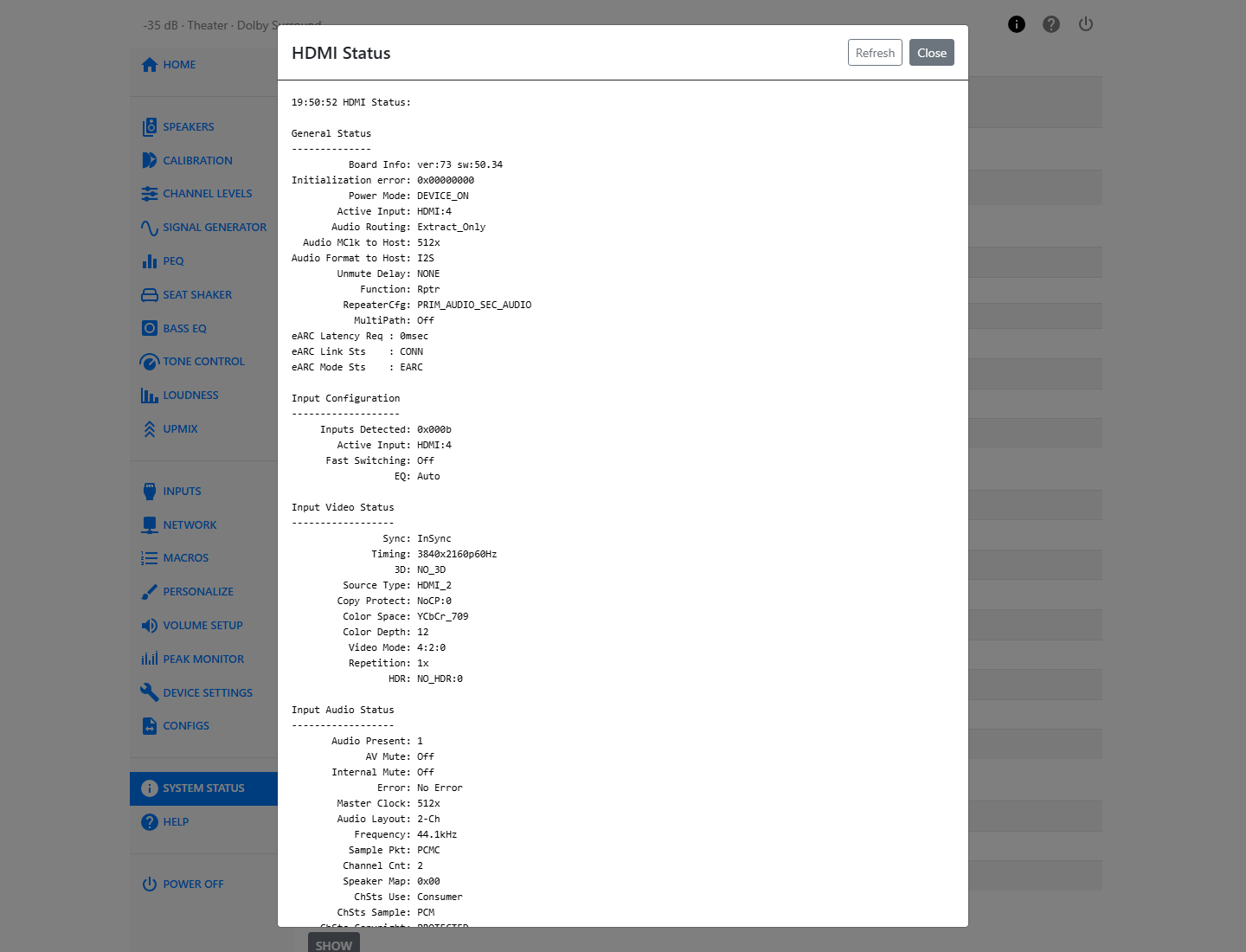
Click Show under HDMI Status to open a detailed dump of the current HDMI connection — useful when troubleshooting handshake, ARC/eARC, or CEC problems with your TV or other HDMI devices. Click Refresh inside the dialog to pull a new reading without closing it.