Loudness
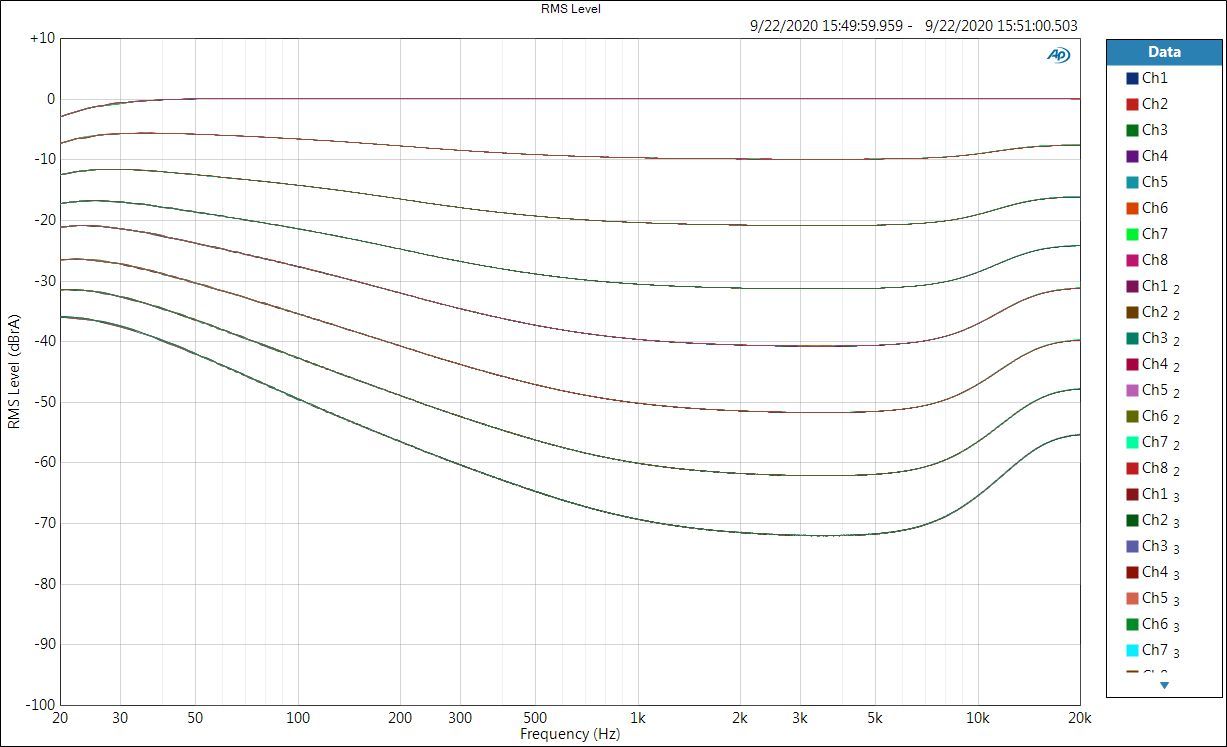
Human hearing is non-linear. When the volume is turned down, listeners report that bass and treble seem to fade before the midrange does. This was first described by Fletcher and Munson in the 1930s, and the equal-loudness contours have since been standardized and repeatedly re-measured. Older audio receivers included a "loudness" button that simply boosted the bass. Loudness compensation on the HTP-1 boosts bass and treble as the volume is turned down, following one of these equal-loudness curves, so quiet listening still sounds full.
Turn loudness compensation on or off with the Loudness Compensation button at the top of the page.
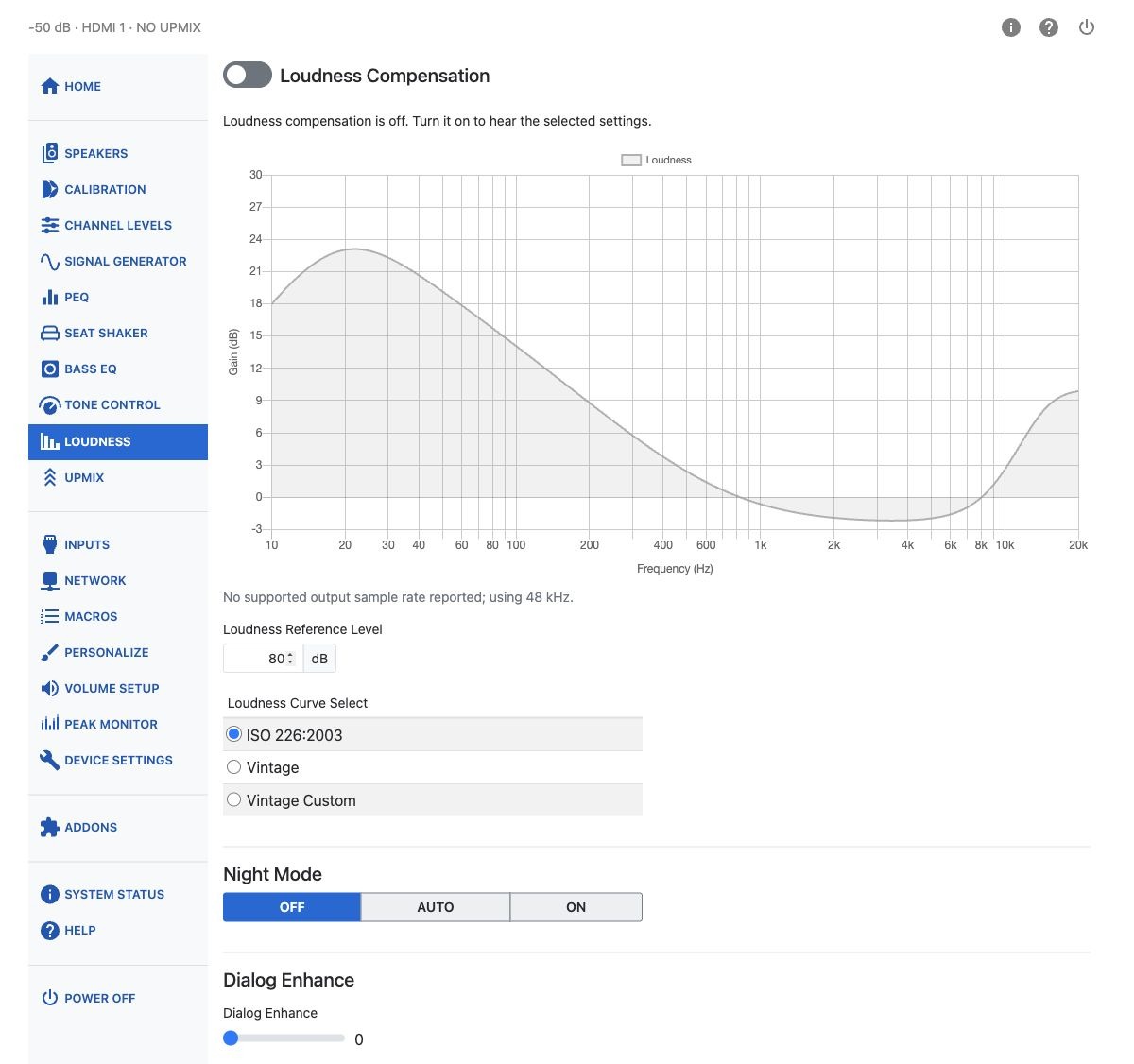
The chart follows the selected loudness curve, reference level, and current volume. When Tone Control is enabled with a nonzero bass or treble adjustment, an additional curve shows its contribution: Loudness + Tone when Loudness is on, or Tone when Loudness is off.
With Loudness off, the loudness curve remains visible in gray for reference and is not applied to the audio. Loudness Reference Level and Loudness Curve Select remain editable, but the Vintage Custom filter controls are disabled until Loudness is turned on.
The loudness response uses the reported output sample rate. If no supported rate is reported, the chart explains that it is using 48 kHz. If a response cannot be fully displayed, check the filter frequencies and bandwidths as directed by the warning.
Loudness Reference Level
The loudness curve needs to be calibrated against how loud your room actually plays at a given volume setting. Loudness Reference Level sets this, from 50 to 90 dB. This control was previously called "Loudness Calibration."
The number corresponds roughly to the sound pressure level at which you want a flat response — your normal listening volume. A higher number means more bass boost is added as you turn the volume down; a lower number means less.
Note
A high-pass filter keeps the compensation from boosting frequencies below 20 Hz. Because the bass boost at low volume can be substantial, you may hear a thump or a tick when switching loudness compensation on or off.
Loudness Curve Select
Choose which equal-loudness curve to follow:
| Curve | Description |
|---|---|
| ISO 226:2003 | The modern, internationally standardized equal-loudness contours. |
| Vintage | An older curve shape, closer to what classic receivers' "loudness" buttons produced. |
| Vintage Custom | The Vintage curve shape, but with its own Low Shelf, PEQ, High Shelf and High-Pass Filter that you can adjust yourself. |
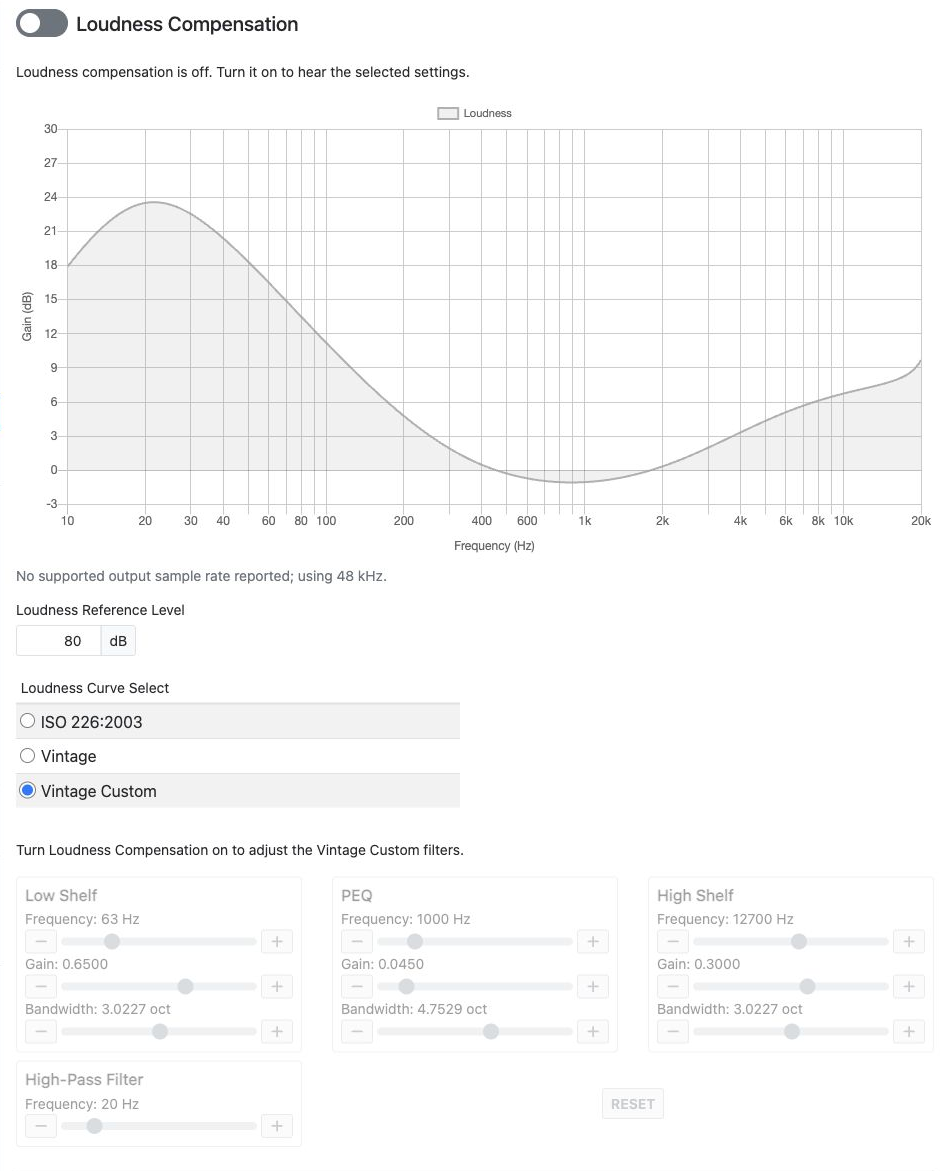
Vintage Custom
Selecting Vintage Custom reveals four filter editors. Each is a simple PEQ-style band; all four are disabled whenever loudness compensation is off.
| Filter | Frequency | Gain | Bandwidth |
|---|---|---|---|
| Low Shelf | 20–200 Hz | 0.01–1 | 1–5 oct |
| PEQ | 200–5000 Hz | 0.01–0.3 | 0.1–8 oct |
| High Shelf | 4000–20000 Hz | 0.01–0.5 | 1–5 oct |
| High-Pass Filter | 10–80 Hz | — | — |
Reset restores the Vintage defaults: Low Shelf at 63 Hz, High Shelf at 12700 Hz, PEQ at 1000 Hz, and the High-Pass Filter at 20 Hz.
Switching between curve types preserves your Vintage Custom settings. Use Reset to restore their defaults.
Night Mode
Action movies are notorious for wide dynamic range: dialog can be very quiet while explosions rock the house. Night Mode reduces the difference between loud and soft, useful if the children are sleeping. It uses features of the Dolby and DTS coding systems, so it has little effect on plain PCM streams.
| Mode | Description |
|---|---|
| Auto | Recommended. Adjusts automatically based on metadata in the program stream — Dolby streams specify their own dynamic range parameters, and Auto follows them. The subwoofer is not attenuated. |
| On | Enables the available Dolby or DTS features to compress the dynamic range, and reduces the subwoofer level by 6 dB, making low-volume listening more comfortable. |
| Off | Disables all such processing, including Dialnorm — dialog normalization, which adjusts overall volume based on a value embedded in the audio stream. This gives the greatest contrast between loud and soft sounds. The subwoofer is not attenuated. |
Dialog Enhance
Some listeners want to hear dialog more clearly. When the content carries DTS Dialog control information, Dialog Enhance uses it directly. Otherwise it simply raises the center channel, since most dialog comes from the center speaker.
Dialog Enhance ranges from 0 (as authored) to 6, using a slider.
Warning
Applying large boosts can result in digital clipping. Check the Peak Monitor if you raise the reference level or dialog enhancement substantially.