Integrations and Control
Using Roon
The HTP-1 is a Roon Ready device — Roon can send audio to it directly, with no separate app or streamer needed. Roon is a music service you subscribe to, built around a locally stored or network-attached music archive that can include high-quality formats like 96 kHz/24-bit and 192 kHz.
A Roon system needs a Roon Server, which knows where your music is (this can run on a PC or a NAS), and a controller to browse your library and press play — the Roon app on a phone or PC. The HTP-1 does not perform either of these roles; it is only the output device.
Select the Roon input on the HTP-1, then pick the HTP-1 as the output zone in Roon. It appears in Roon's device list under whatever you've set as your Unit Name on the Device Settings page.
The Roon input uses the same listening modes as other inputs. Choose No Upmix to play without upmixing. For high-resolution playback at the source sample rate, also switch Dirac Live off. See Sample Rates and No Upmix for the processing limits.
Note
Streaming at 44.1 kHz can be less stable through the Dirac Live path than 48 kHz. If you see issues, set Roon to resample to 48 kHz for this zone.
See System Status for the current release notes, which cover the latest Roon behavior and any open issues.
Mobile Remote
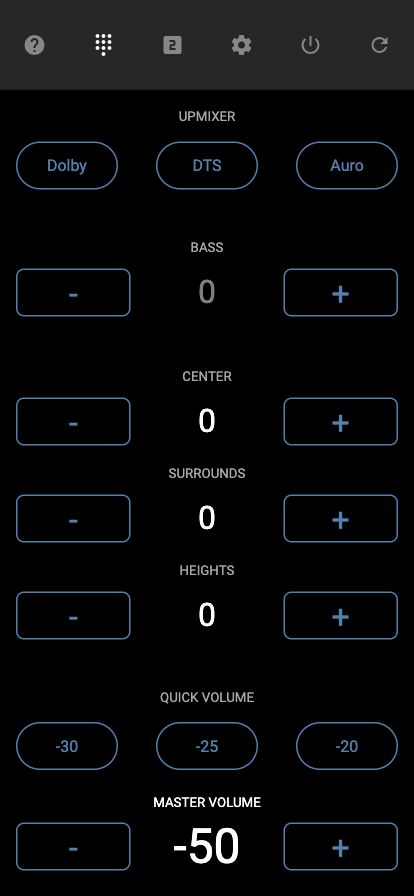
The HTP-1 serves a simple remote control page for phones and tablets at
http://<your-htp1-ip>/remote/. It gives you a lightweight way to control volume, bass, upmixer, center/surrounds/heights level, and
power without loading the full web UI.
HTTP Control
The HTP-1 accepts IR commands over plain HTTP, which makes it straightforward to drive from home automation systems such as Control4, Home Assistant, or Crestron, or from your own scripts. Send a request to:
http://<your-htp1-ip>/ircmd?code=XXXX
where XXXX is one of the codes from the IR code tables in Reference.
More than one code can be sent at once, separated by commas.
-
Turn on Dirac Live filter slot 1 and unmute:
curl "http://<your-htp1-ip>/ircmd?code=7887,4cb3" -
Select HDMI 1 and set the listening mode to Auto:
curl "http://<your-htp1-ip>/ircmd?code=0ff0,1ee1"
Every request returns the full system status as JSON, so a script can also use /ircmd to read
current state after making a change.
Third-Party Applications
A number of third parties have built their own tools around the HTP-1, which are listed in the separate Apps & Integrations section.
They are discussed in the Official Monoprice Monolith HTP-1 Owners Thread on the AVS Forum.
If you're building your own integration, see the Developers section of this site for the underlying control protocol.