Seat Shaker
A seat shaker — also called a tactile transducer, ButtKicker, or bass shaker — is bolted to a chair or to a riser under the seating. It turns low-frequency signal into motion you feel rather than sound you hear. The HTP-1 generates a dedicated seat shaker signal with its own input source, filtering, delay, gain, trim and PEQ, and routes it either to an XLR output or to the Mix Out RCA outputs.
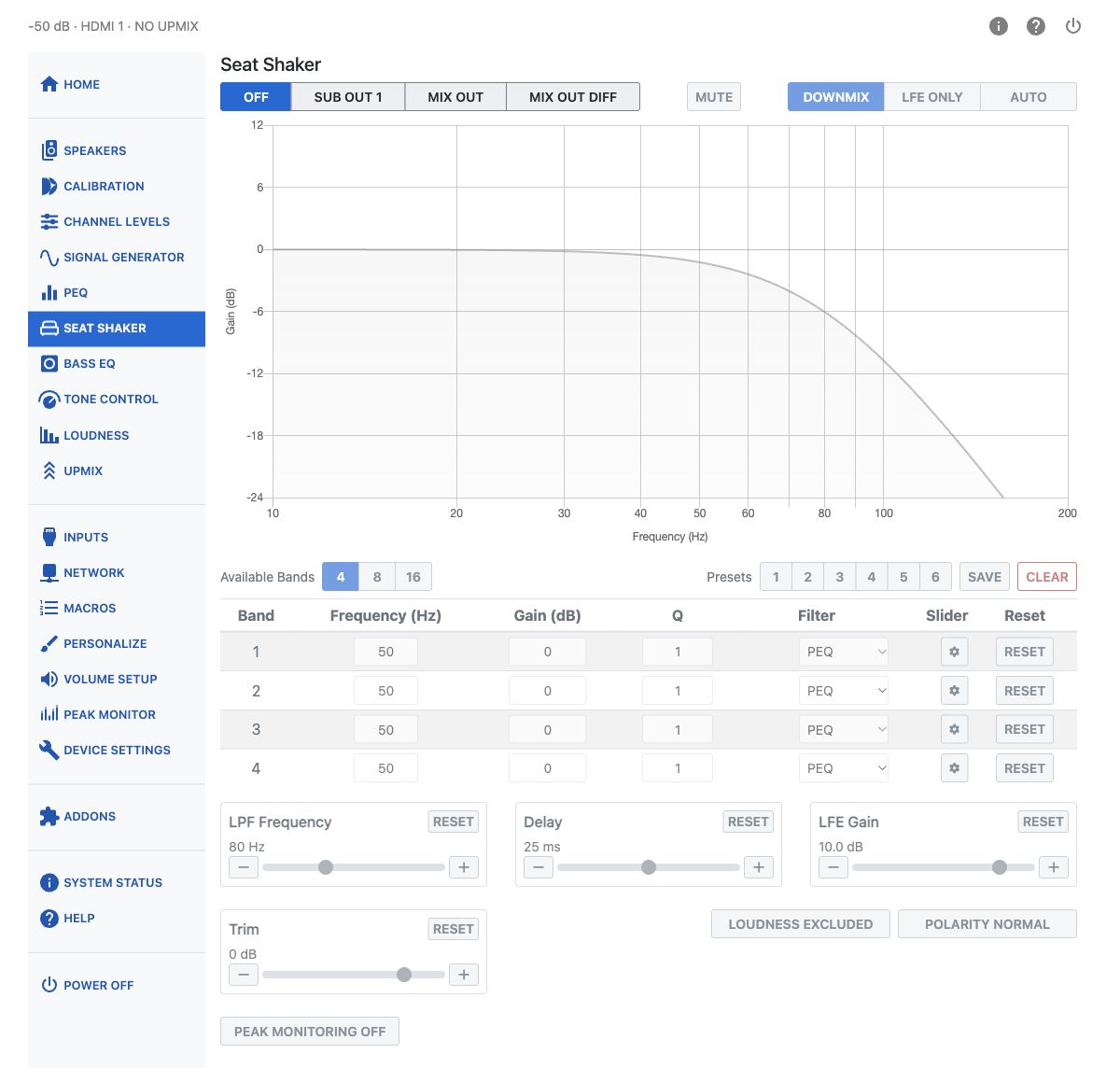
Output
Choose where the seat shaker signal is sent.
| Option | What it does |
|---|---|
| Off | No seat shaker signal is generated. A standard stereo mixdown of the input signal is sent to the Mix Out. |
| Sub Out n | The seat shaker signal is routed to one of the XLR outputs. The number shown is the next available subwoofer slot. |
| Mix Out | The seat shaker signal is sent to the Mix Out. Both outputs carry the same signal. |
| Mix Out Diff | The seat shaker signal is sent to the Mix Out. The left and right outputs carry the same signal with inverted polarity. |
Note
When Sub Out is selected, that output is highlighted in yellow on the Speaker Map on the Speakers page, so you can always see which physical output the seat shaker has claimed.
Note
While Output is set to Off, every other control on this page is locked. The page still displays the settings it will use — the Content selection stays lit, for example — but nothing can be changed until an output other than Off is chosen.
Mute
Mute silences the seat shaker without changing the Output selection, so you can quickly compare how the system sounds with and without the seat shaker. It becomes available once an output other than Off is chosen.
Input Source
Choose what the seat shaker plays.
| Option | What it does |
|---|---|
| Downmix | The seat shaker receives a downmix of all input channels, including the LFE channel. |
| LFE Only | The seat shaker receives only the LFE channel. |
| Auto | The seat shaker receives the LFE signal when it is present, and automatically reverts to an all-channel mixdown when the source material has no dedicated LFE channel. |
Response Chart
The chart on the page shows the seat shaker's frequency response in real time, combining the LPF setting and the PEQ bands below it. Use it to see the effect of a filter change before you feel it.
Available Bands and PEQ
Choose how many PEQ bands are available: 4, 8, or 16. Reducing the band count resets any bands above the new count back to their default values, so the page asks you to confirm before it does this.
Each band has the following controls:
| Column | Range | Notes |
|---|---|---|
| Frequency | 10–150 Hz | Center or corner frequency of the band. |
| Gain | −20 to +12 dB | Hidden for filter types that have no gain (All Pass, LPF, HPF). |
| Q | 0.1–10 | Hidden for the All Pass 1st Order type. |
| Filter Type | PEQ, Low Shelf, High Shelf, All Pass 1st Order, All Pass 2nd Order, LPF, HPF | Changing type shows or hides the Gain and Q fields as needed. |
| Reset | — | Returns that single band to its default (50 Hz, 0 dB, Q 1, PEQ). |
Click the gear icon at the right of a band's row to expand it into sliders with step buttons, for finer adjustment than the number fields allow.
Warning
Large EQ boosts can cause digital clipping. Watch the level with Peak Monitoring after adding gain to any band.
Presets
Six preset slots store a complete seat shaker setup: content, LPF, delay, LFE gain, trim, polarity, band count, and all PEQ bands.
- Select Preset 1–6 to recall a stored setup.
- Save asks which of the six slots to save the current settings into.
- Clear removes the saved data from the active preset and returns the page to defaults.
A preset button changes color when its stored settings differ from what is currently on the page, so you can tell when you have made changes that have not been saved.
LPF
Sets the low-pass filter corner frequency for the seat shaker, from 20 to 200 Hz. The default is 80 Hz. Use this to remove higher frequencies from the signal. The shaker cannot reproduce them effectively, and they can cause unwanted buzzing.
Delay
Adds up to 50 ms of delay to the seat shaker channel, in addition to any speaker distance compensation, so the tactile effect is aligned in time with the rest of the system. The default is 25 ms, which compensates for the processing latency introduced by Dirac Live.
LFE Gain
Sets the gain applied to the LFE content feeding the shaker, from 0 to 12 dB in 0.5 dB steps. The default is 10 dB: LFE is typically recorded 10 dB lower than the main channels, so it is boosted by 10 dB to match their level.
Trim
Adjusts the overall level of the seat shaker signal, from −24 to +6 dB. The default is 0 dB.
Loudness
Loudness Included / Excluded chooses whether loudness compensation is applied to the seat shaker signal, boosting bass as volume decreases. It follows the settings configured on the Loudness page.
Polarity
Polarity Normal / Inverted inverts the polarity of the seat shaker signal — effectively the same as swapping the input wires on your seat shaker.
Peak Monitoring
Peak Monitoring lets you watch the seat shaker signal level to prevent clipping. The indicator turns red when the signal exceeds 0 dBFS, showing that clipping is occurring. Lower the Trim setting to keep the signal below this threshold for optimal performance without distortion.
Setting Levels and Headroom
The XLR outputs combine analog and digital volume control. Full configured digital headroom is preserved up to Highest playback volume that preserves digital headroom, shown in Volume Setup. Above that threshold, available headroom decreases and clipping may occur. Loudness and other volume-dependent processing can also change peak readings.
The Seat Shaker signal on Mix Out RCA uses digital volume control. Check it at the loudest master-volume level you plan to use. Peak Monitor measures digital sample peaks, not analog output-stage clipping.
Hearing safety
To protect your hearing and speakers, mute all speakers on Calibration before setting headroom for the Seat Shaker RCA outputs. Large EQ boosts can also cause clipping. See also Safety.