Personalize
The Personalize page controls what appears on the Home Page, what shortcuts you see throughout the web UI, and a few display preferences for the interface as a whole. A live preview of the Home page sits alongside the settings, so you can see the effect of a change immediately.
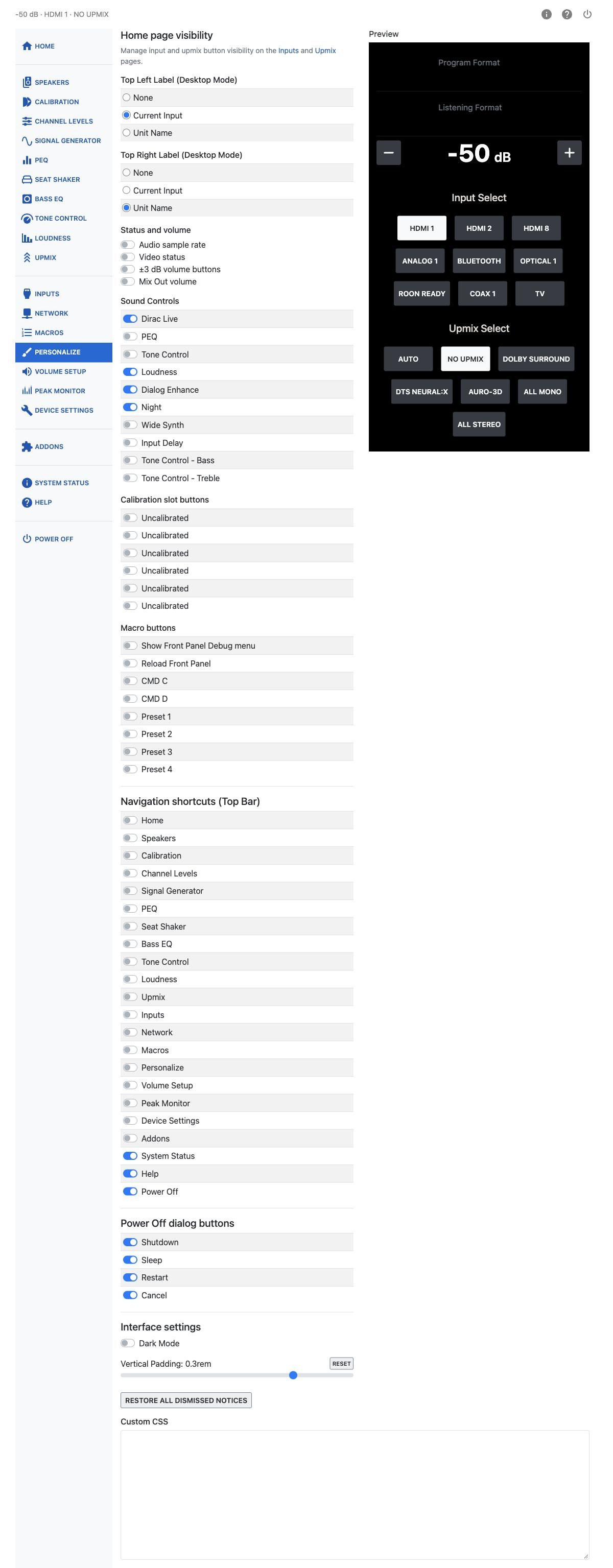
Homepage Status Display
Choose what appears in the top-left and top-right corners of the Home page in desktop mode: nothing, the current input name, or the unit name.
Use these switches to choose additional Home page displays and volume buttons:
| Switch | Effect |
|---|---|
| Display Video Status on Homepage | Adds the Video status card. |
| Display Audio Sample Rate on Homepage | Adds the sample rate to the Program Format and Listening Format cards. |
| Display Mix Out Volume on Homepage | Adds the Mix Out Volume control below the main volume. |
| ±3 dB volume buttons | Adds outer −3 and +3 buttons to Main Volume and Mix Out Volume. Each press applies a single 3 dB step. |
Note
"Display Mix Out Volume on Homepage" is unavailable when the Seat Shaker is using the Mix Out.
Shortcuts
Choose which pages get a shortcut icon in the shortcut bar. Home and Power Off can each be shown or hidden, along with every other settings page.
Power Off Shortcut Buttons
If the Power Off shortcut is turned on, choose which buttons appear in the power dialog: Shutdown, Sleep, Restart, and Cancel.
These choices affect only the dialog opened from the Power Off navigation shortcut. Other ways of opening the Power dialog show all options.
Sound Controls
Choose which buttons appear in the Home page’s Sound Controls section: Dirac Live, PEQ, Tone Control, Tone Control - Bass, Tone Control - Treble, Loudness, Dialog Enhance, Night Mode, Wide Synth, and Input Delay (lip-sync).
Homepage Dirac Live Slots
Choose which Dirac Live filter slots get a button on the Home page. Each slot is listed by name, or as "Uncalibrated" if it holds no filter.
Homepage Macros
Choose which macros get a button on the Home page, both the eight remote-button macros and any additional macros you have created. See Macros.
Settings
| Setting | Effect |
|---|---|
| Dark Mode | Switches the web UI (other than the Home page, which is always dark) between light and dark display styles. |
| Vertical Padding | Adjusts the row spacing used in tables throughout the web UI, from 0 to 0.4 rem. |
| Restore All Dismissed Notices | Restores optional tips hidden on this HTP-1. Dismissals are saved on the unit and shared by all browsers. |
User CSS
An advanced option for owners comfortable with CSS. Enter custom styles here to change the appearance of the web UI beyond what Dark Mode and Vertical Padding offer.
Preview
The preview shows the compact Home layout. On wide screens it stays beside the controls and can be scrolled independently; on smaller screens it appears below them. Desktop labels, navigation shortcuts and Power Off dialog buttons are not included.